Manual Unpacking 64-bit UPX-Packed Executables
A comprehensive guide to identifying and manually unpacking 64-bit UPX-packed binaries using 5 distinct reverse engineering techniques: Tail Jump, Memory Write, DEP Trick, Call Stack Backtracing, and Injecting Payload to an allocated memory.

Introduction
The techniques demonstrated in this post are heavily inspired by the Techniques presented in Practical Malware Analysis (Sikorski & Honig, 2012) and Mastering Malware Analysis (Kleymenov, 2020). I highly recommend both resources for deeper understanding.
What is Packing?
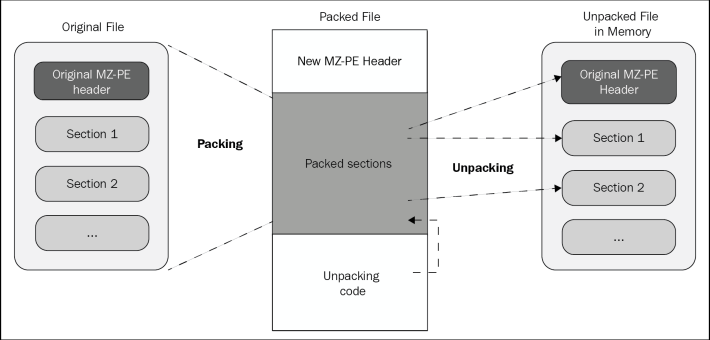
Packing compresses or encrypts an executable’s original code and stores it as data inside a new wrapper. The main goals are reducing file size and avoiding detection by antivirus or static analysis tools.
Malware authors use packing to hide malicious code behind a compression layer. What an analyst sees initially is only a small unpacking stub, not the real program. Unlike encryption (which limits access via a key), packing focuses on obfuscation.
What is Unpacking?
Unpacking restores the original code into memory at runtime so it can actually run.
The unpacking stub does three things:
Unpack —> Decompresses or decrypts the original code back into memory
Resolve imports —> Finds addresses for required DLLs and APIs
Tail jump —> Transfers execution to the Original Entry Point (OEP)
How to Identify a Packed Program?
You can spot a packed program by looking for these signs:
Few readable strings
Small import table —> Only basic APIs like LoadLibrary and GetProcAddress appear; the rest are resolved at runtime
Abnormal section sizes — Virtual Size is much larger than Raw Size (e.g., .text section), meaning code expands in memory
High entropy — Compressed or encrypted data looks random, not structured like normal code.
You can check those via static analysis tools like PEID, DIE, PEStudio etc…
How to unpack that Packed Program?
You can unpack programs automatically with tools or manually using a debugger. This post focuses on few manual unpacking techniques.
This simple code will be used for Technique 1 through 3. I packed it with UPX 5.1.1:
1
2
3
4
5
6
7
8
9
10
11
12
13
14
15
16
17
18
19
20
21
#include <stdio.h>
#include <string.h>

int check(char *input) {
    return strcmp(input, "CrackMe123") == 0;
}

int main() {
    char pass[9];


    printf("Enter password: ");
    scanf("%8s", pass);

    if (check(pass)) {
        printf("Good job!\n");
    } else {
        printf("Nope!\n");
    }
    return 0;
}
Key Concepts Used Throughout Techniques
Here are the memory regions as shown in x64dbg that we’ll reference repeatedly:
1
2
3
4
Address=00007FF69B8A0000  | Size=0x1000  | packed.exe
Address=00007FF69B8A1000  | Size=0x3F000 | "UPX0"
Address=00007FF69B8E0000  | Size=0x24000 | "UPX1"
Address=00007FF69B904000  | Size=0x1000  | "UPX2"
Calculating start + size gives us the boundaries:
1
2
3
4
5
Region	        Start	         Size	     End
packed.exe	00007FF69B8A0000 0x1000	00007FF69B8A1000
UPX0	       00007FF69B8A1000	0x3F000	00007FF69B8E0000
UPX1	       00007FF69B8E0000	0x24000	00007FF69B904000
UPX2	       00007FF69B904000	0x1000	00007FF69B905000
As we see UPX0 is large —> likely where unpacked code will live. UPX1 is smaller —> probably the unpacking stub.
Imports
The packed binary imports only these APIs: 
This minimal import table is a strong sign of packing, the real imports will be resolved manually at runtime.
UPX1 writes decompressed data into UPX0, then jumps there. All Techniques below rely on observing or intercepting this transition.
Technique 1: Tail Jump
First approach relies on tracing execution through the unpacking stub until the control transfer to the original code occurs.
Since the stub resides in the UPX1 region, we expect the transition to start from there.
The unpacking stub’s initial instructions often appear as unstructured or obfuscated code in the debugger before the decompression logic begins. 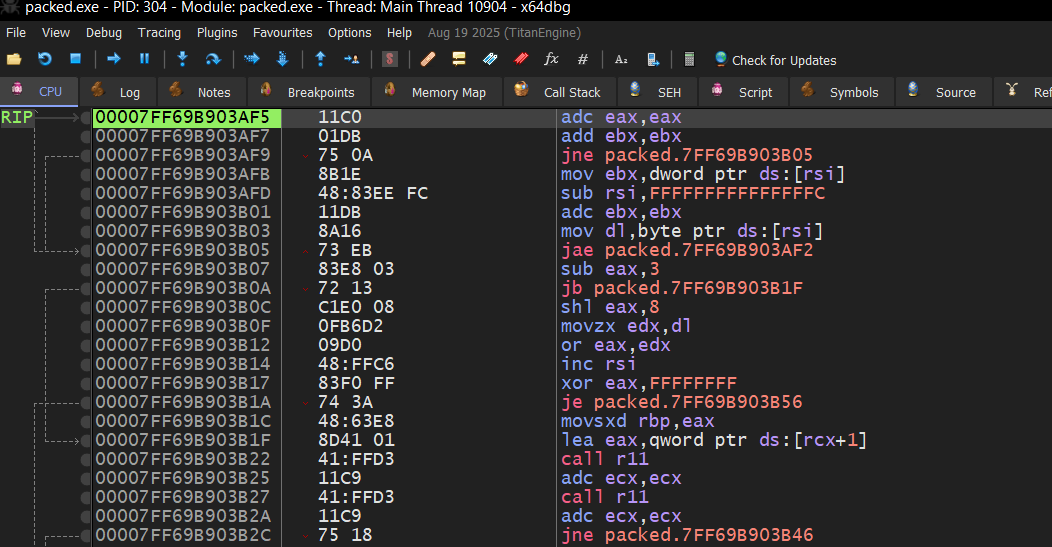 stub ugly code while opening in x64dbg
While stepping through execution, we see the following instruction:
1
00007FF69B903CBB | jmp 00007FF69B8A1410
The source address (0x903CBB) lies inside the UPX1 region, which confirms that it is part of the stub.
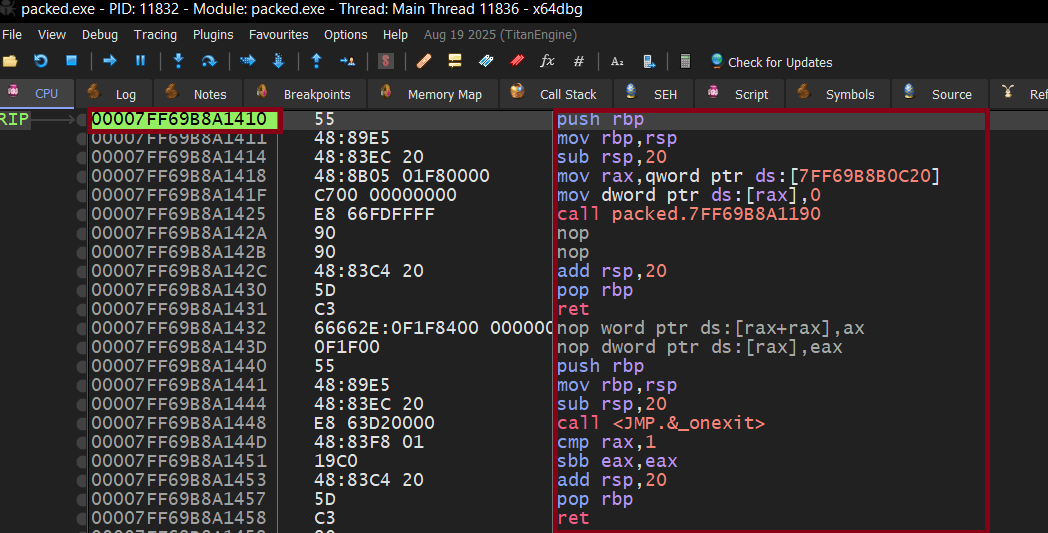
Following this jump leads to:
1
00007FF69B8A1410 | push rbp
push rbp is a standard function prologue, not decompression logic. This is the Original Entry Point (OEP).
here how it looks like inside x64dbg: 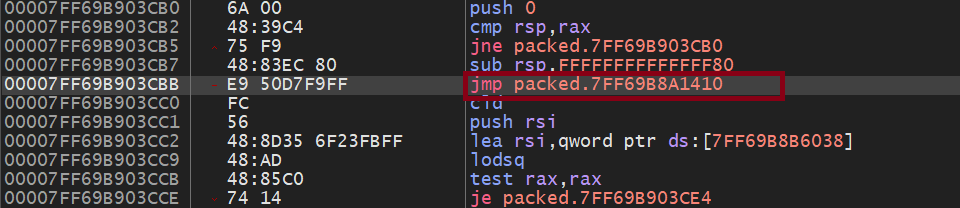 |
| 
Although I wanted only to use the debugger, but I just wanted to make sure the tail jump is correct so I made a double check in IDA 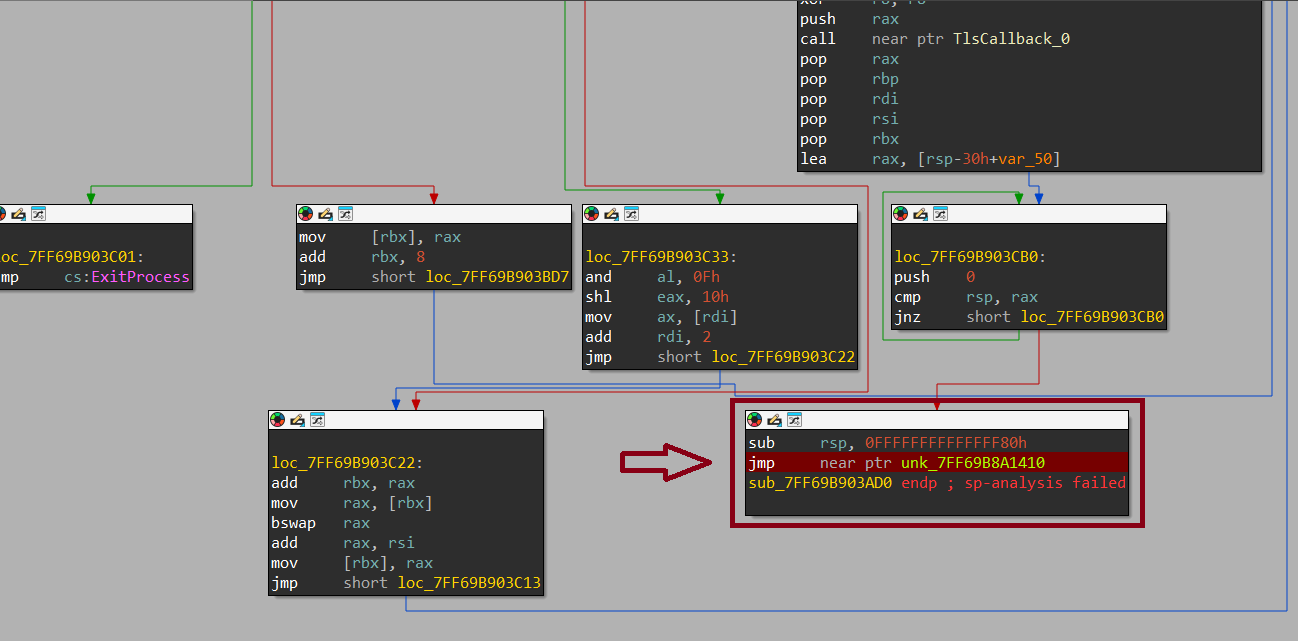
Using Scylla
When I tried to dump the process with Scylla and tried the IAT rebuild. Scylla reports: 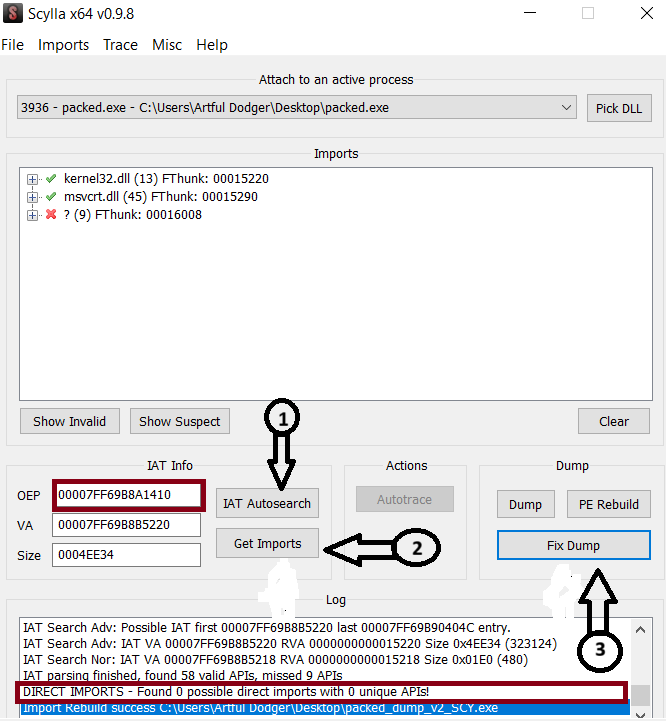
“Direct IMPORTS, found 0 Possible direct imports with 0 unique APIs”
It confused me but after a small search I knew that This isn’t a failure, the binary has no static IAT. It resolves APIs at runtime using LoadLibraryA and GetProcAddress, then calls them directly. Scylla can’t rebuild what isn’t there.
After Unpacking
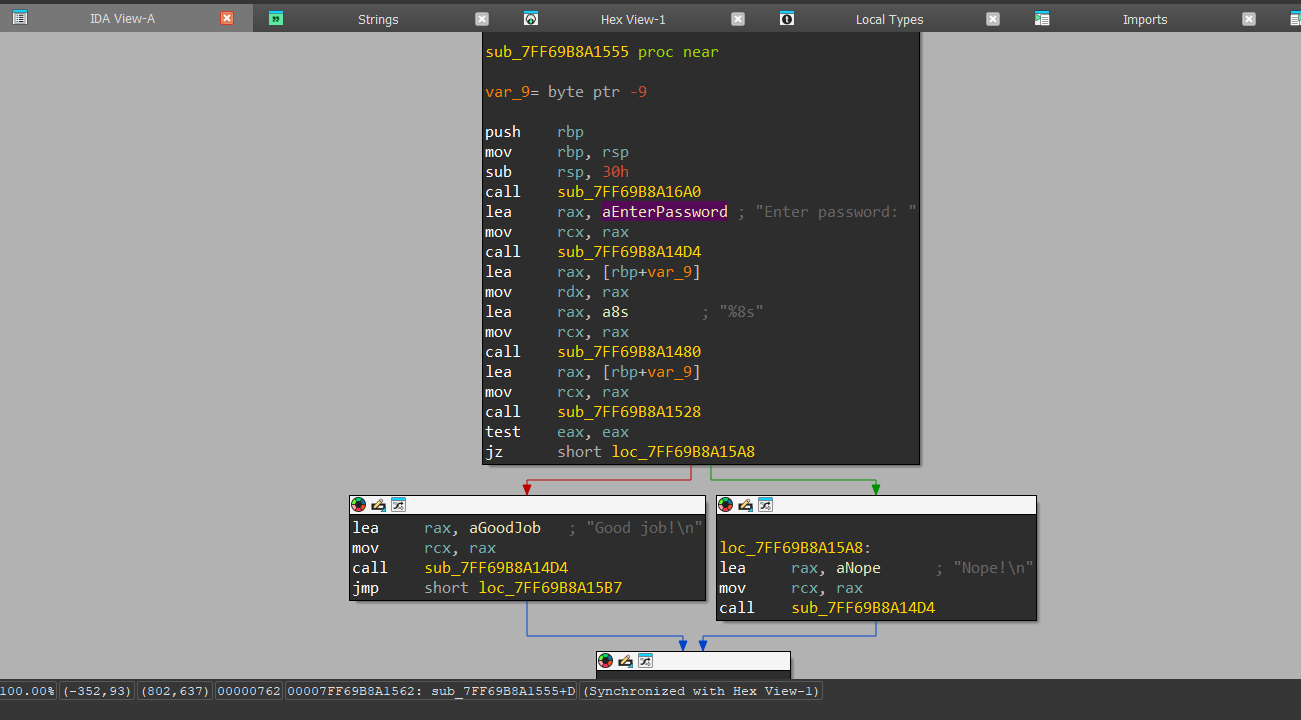
Note
This method works really well when the packer is simple or already known, especially when it uses a direct jump to the OEP after unpacking.
Most of the time, this is the first thing I try because it’s fast and straightforward.
But it doesn’t always hold up. Once you deal with more advanced packers, things change. Instead of a clean jmp, you might see indirect jumps, call/ret tricks, or even exception-based transfers. Some samples also add anti-debugging to hide that final jump completely.
So while it’s simple and effective, it’s not something you can rely on in every case. ***
Technique 2: Memory write
As said Earlier that UPX0 is where the unpacked code will be written in, and as we see here in PeStudio, its size on disk is 0 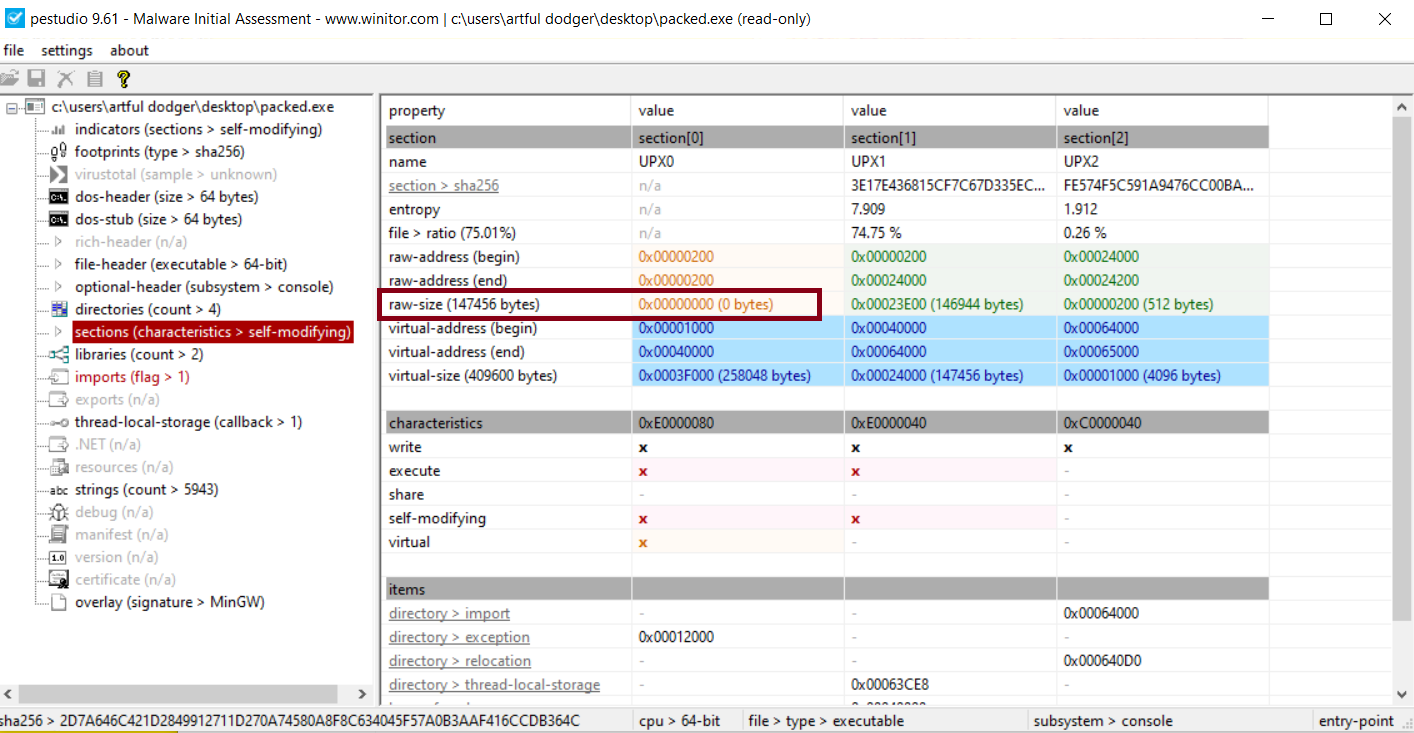
This technique is based on placing a write breakpoint on the UPX0 region and waiting for it to trigger.
Once the bp hits, by looking at the address 00007FF69B903AD8, inside UPX1 ‘At the moment the breakpoint is triggered, execution is still within the UPX1 region, confirming that the unpacking stub is actively writing data into UPX0.’
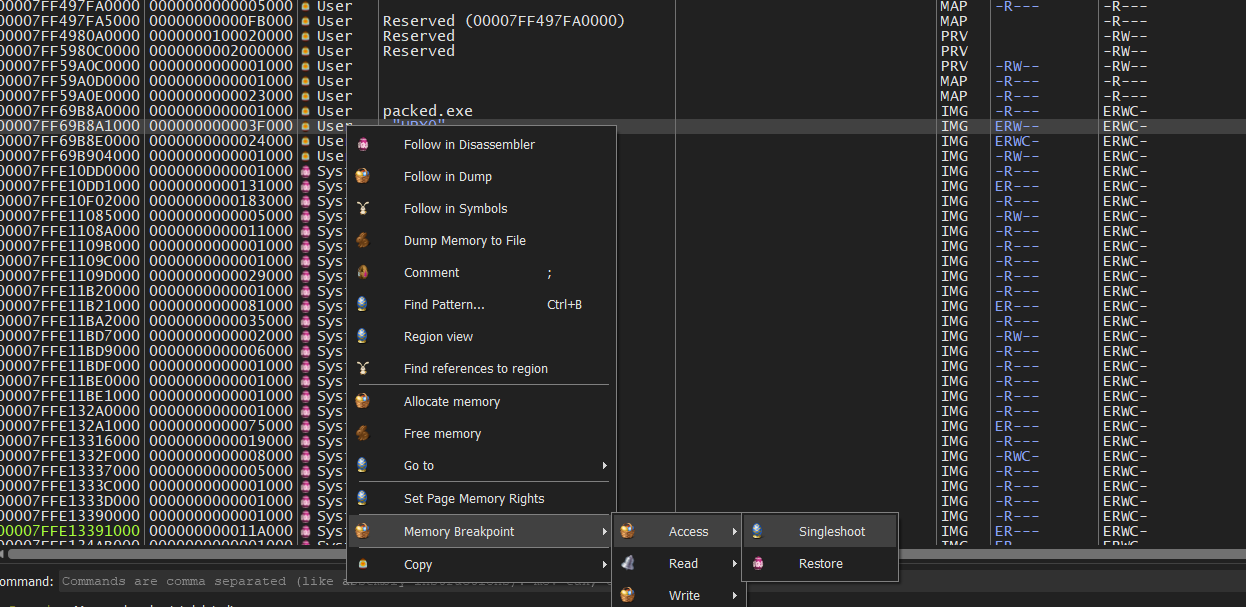 Resume execution (F9) and monitor the hardware breakpoint.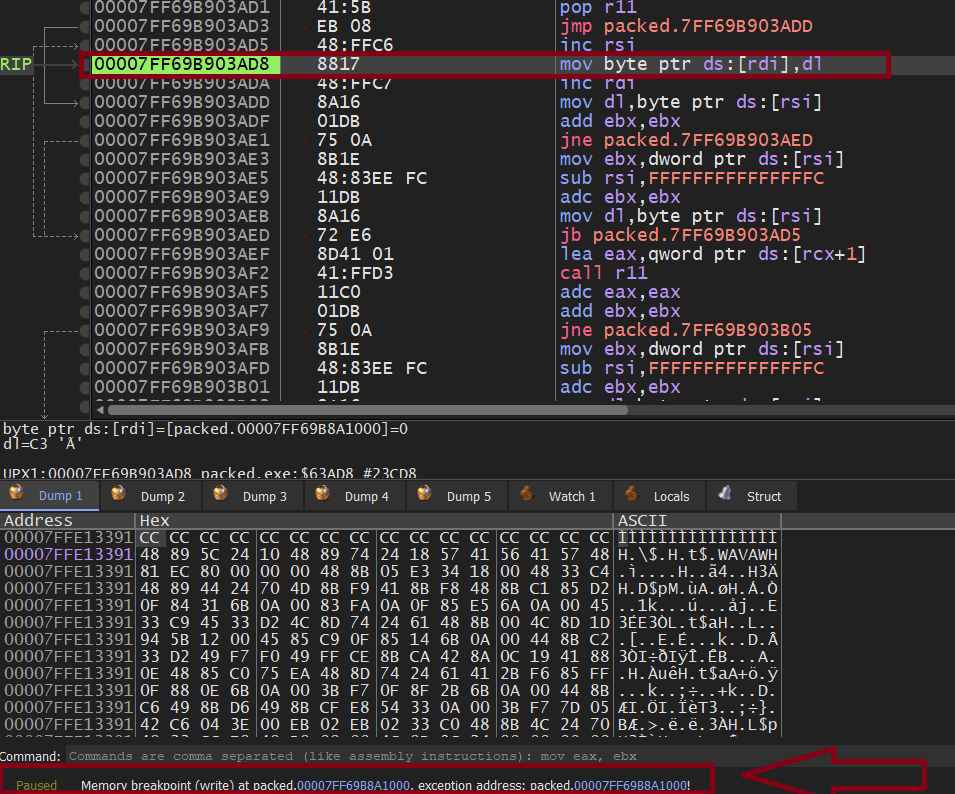
After few single steps, the decompression code appears where data are written from UPX1 to UPX0 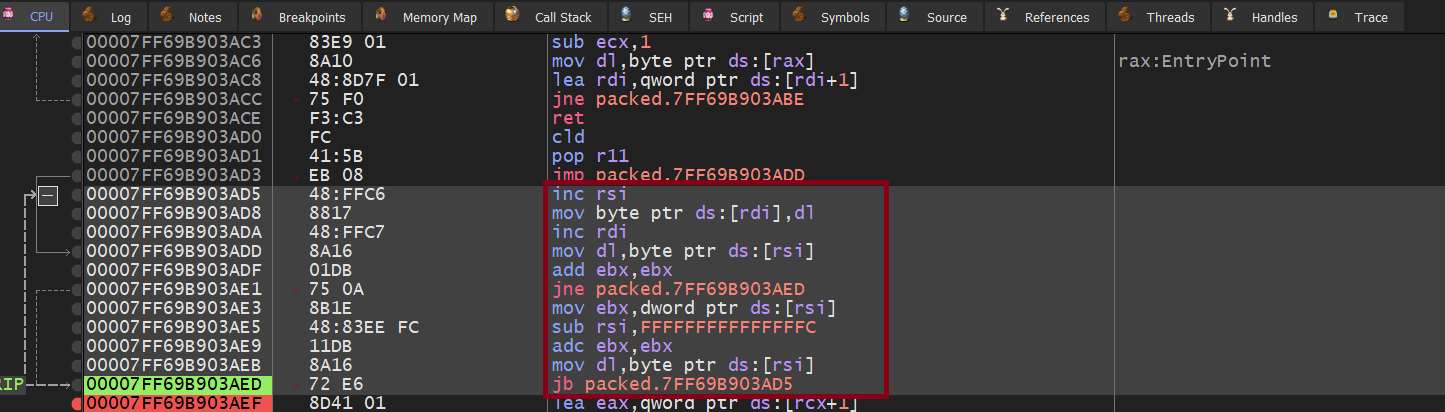
I followed the region that rdi points at to observe how it changes during the execution 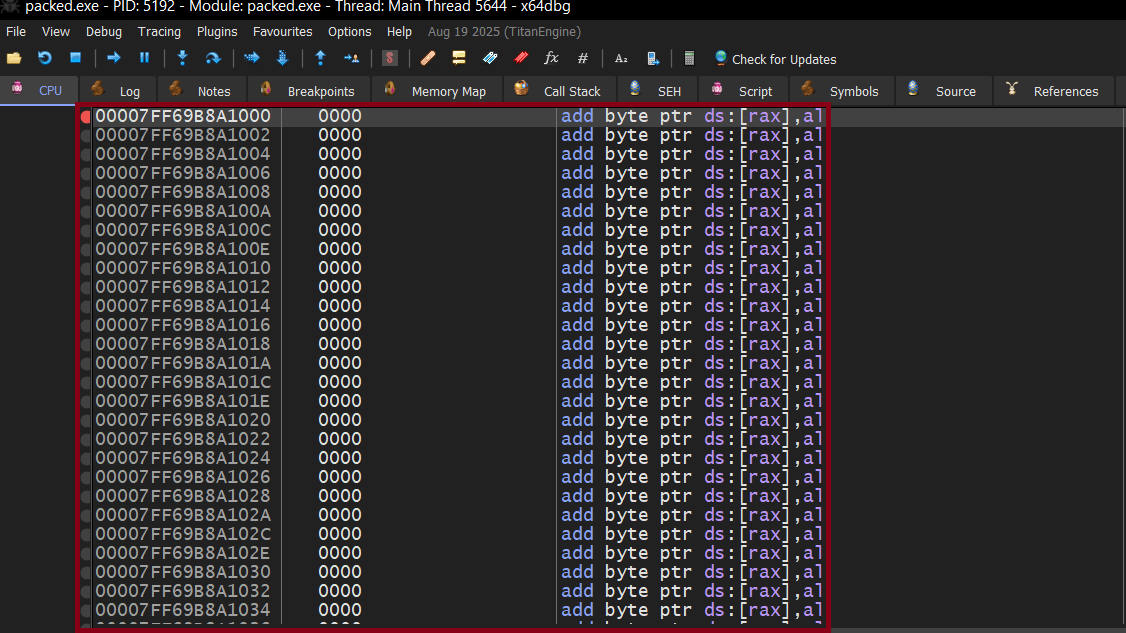 |
| 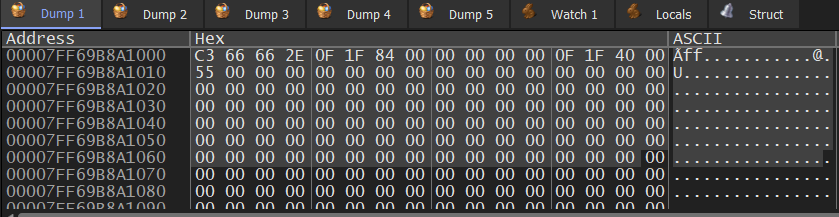 region before and while writing data
Now If I kept the write breakpoint and kept running the program I will wait the whole day until it finishes, I already knew where the decompression code, so At this point, I already knew where the decompression loop was, so instead of stepping forever, I removed the breakpoint and let the stub finish writing the data. 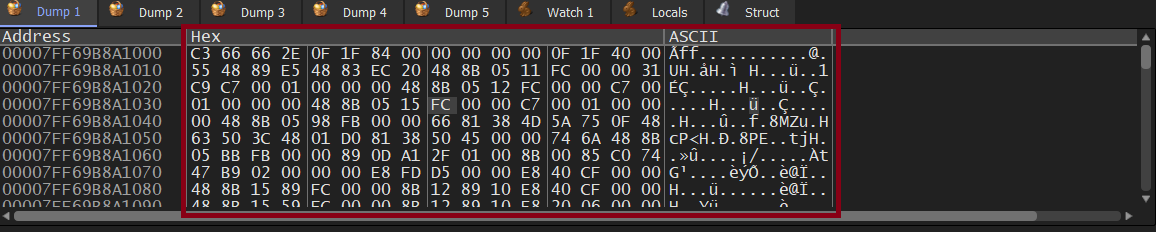 region after being filled with data
After letting the loop finish Execute Till Return, Just after few statements, execution naturally reached the control transfer point, which leads to the same OEP identified in Technique 1.
Using Scylla
from here we can use Scylla the same way as mentioned in technique 1.
Note
This one focuses on what really matters: where the unpacked code is written.
Instead of chasing execution flow, we watch the moment the stub starts writing the real code into memory. That makes it much more reliable when control flow is messy or intentionally obfuscated.
It works especially well when the unpacking process involves heavy decryption or decompression into a specific region, like UPX0.
Even if the final jump is hidden or split into multiple steps, the data still has to be written somewhere, and that’s exactly what we track here.
Technique 3: Execution Breakpoint (DEP Trick)
DEP lets you mark memory pages as non-executable. If the CPU tries to execute code from a non-executable page, it raises an exception.
In our case, we already know that the UPX0 region is where the unpacked code will be written, and eventually execution will be transferred there.
So instead of following the unpacking process step by step, we flip the logic.
We change the protection of that region to make it non-executable.
The unpacking will still happen normally, since writing is allowed, but the moment the program tries to execute code from that region, the CPU will raise an exception.
And that exception is exactly what we are waiting for, because it happens right at the transition to the real code.
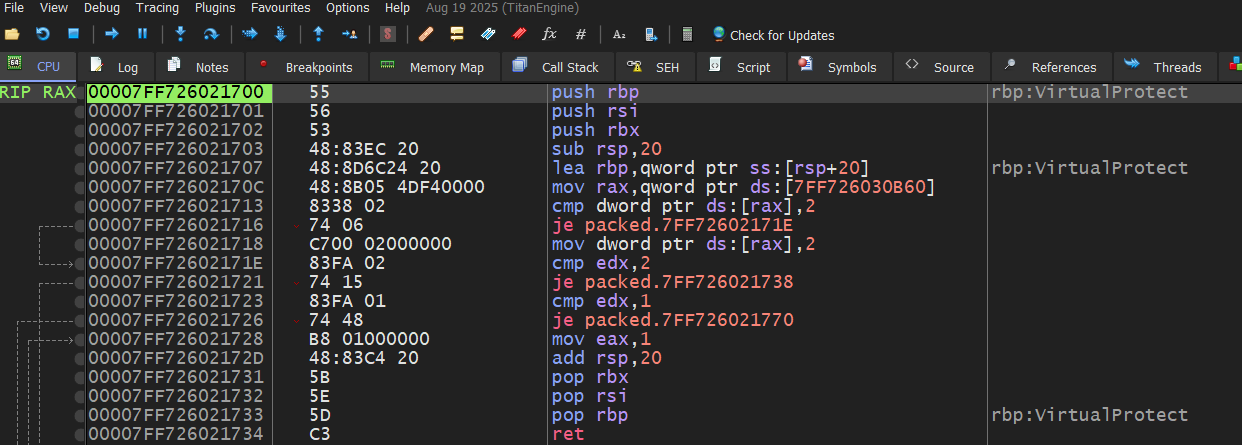
Now we will start by making UPX0 non-executable in the memory region as shown by setting page memory rights to RW 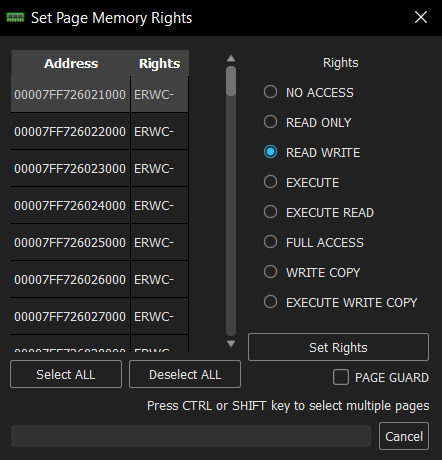 changing page access rights then when we run run the program exception occurs
  |
| 
So we now are at the beginning of the UPX0 region Different EP from Previous Technique
Using Scylla
As usual I used Scylla to dump it 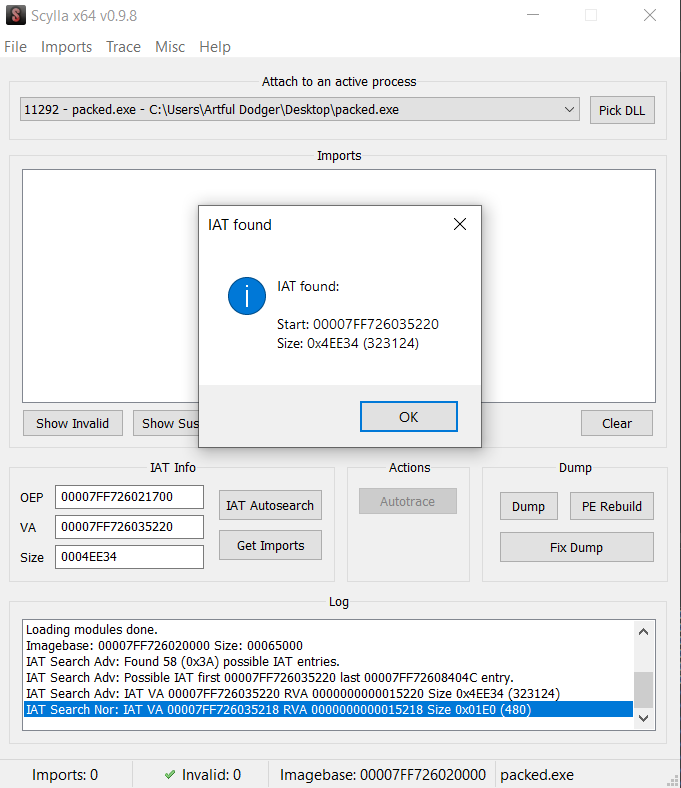 And this is how it looked after unpacking in IDA
 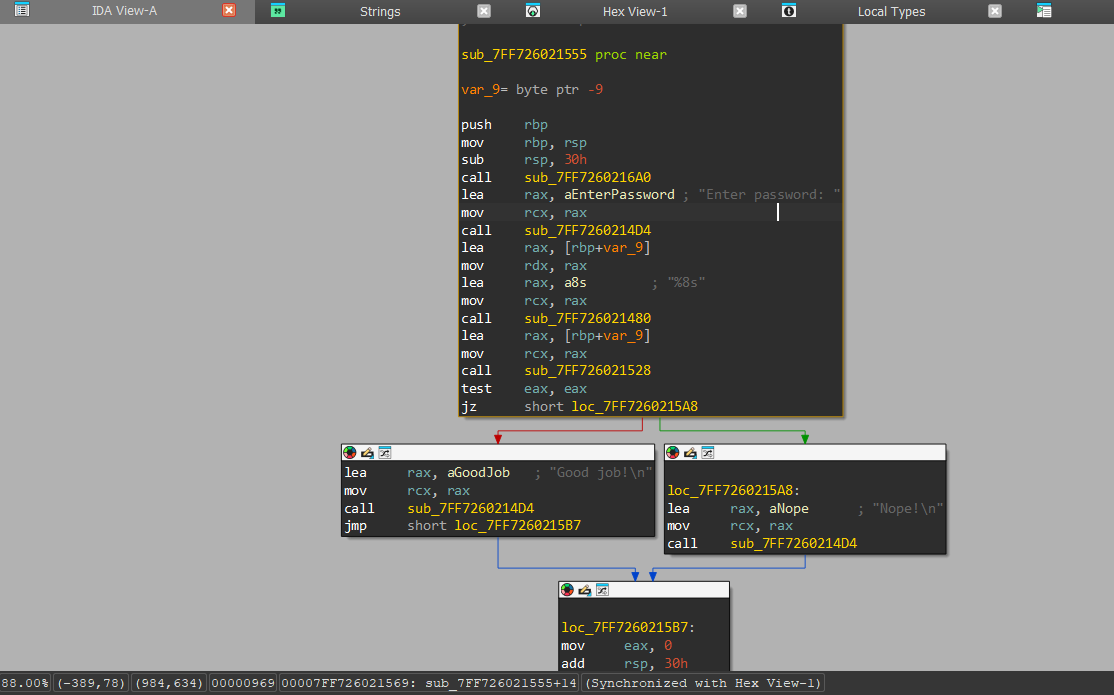 .
.
Note
DEP may land on CRT startup instead of main. Both produce valid unpacked binaries, the difference is whether you enter at main or the runtime initializer.
This approach eliminates the need for manual tracing or behavioral analysis, as the processor itself enforces the detection of the execution boundary between packed and unpacked code.
Unlike other Techniques, this one doesn’t trace anything, we let the CPU tell us exactly where execution jumps to unpacked code. **
Technique 4: Call Stack Backtracing
The idea in simple terms is to break on an API call inside unpacked code, then walk the call stack backward until we hit the first instruction in the decrypted code.
To do this properly, the breakpoint must be hit after the unpacking phase is already done. Behavioral analysis or sandbox reports can help identify which APIs the program uses, so we know where to break.
This technique becomes very useful when the unpacked code makes multiple API calls before reaching its main logic, because the stack will clearly show the execution path.
However, it is not always applicable.
In this code sample, the transition from the unpacking stub to the OEP happens directly, without calling higher-level APIs. Because of that, the call stack does not give useful information about the unpacking boundary, making this Technique less effective for locating the OEP itself here.
Here is the code used for this technique:
1
2
3
4
5
6
7
8
9
10
11
12
13
14
15
16
17
18
19
20
21
22
23
24
25
26
27
28
29
30
31
32
33
34
35
36
37
38
39
40
41
42
43
44
45
46
47
48
49
50
51
52
53
54
55
56
57
58
59
60
61
62
63
64
65
66
67
68
69
#include <windows.h>
#include <stdio.h>
#include <string.h>

void decode(char *data, int len, char key) {
    for (int i = 0; i < len; i++) {
        data[i] ^= key;
    }
}

char* allocate_and_prepare() {
    SIZE_T size = 0x100;

    char *mem = (char*)VirtualAlloc(
        NULL,
        size,
        MEM_COMMIT | MEM_RESERVE,
        PAGE_READWRITE
    );

    if (!mem) return NULL;

    strcpy(mem, "kfool"); // "hello" XORed with 3
    decode(mem, strlen(mem), 3);

    return mem;
}

int validate_input(const char *input, const char *real) {
    return strcmp(input, real) == 0;
}

void execute_logic() {
    char input[50];

    printf("Enter password: ");
    fgets(input, sizeof(input), stdin);

    input[strcspn(input, "\n")] = 0;

    char *real = allocate_and_prepare();
    if (!real) return;

    if (validate_input(input, real)) {
        printf("Access Granted\n");
    } else {
        printf("Access Denied\n");
    }

    VirtualFree(real, 0, MEM_RELEASE);
}

void stage3() {
    execute_logic();
}

void stage2() {
    stage3();
}

void stage1() {
    stage2();
}

int main() {
    stage1();
    return 0;
}
Before jumping into this technique, there’s a simple idea we need to understand.
When a function is called, the CPU pushes a return address onto the stack. This address tells the program where to go back after the function finishes.
In 32-bit programs, this usually comes with stack frames using EBP, where each function saves the previous one and builds its own. This creates a chain of function calls.
In 64-bit programs, this is not always used in the same way, but the important part is still there:
Every function call leaves a return address on the stack.
So at any point during execution, the stack is basically showing the path the program took to get here.
And this is exactly what we are going to use in this Technique. I will put that breakpoint, enter random password and see what happens 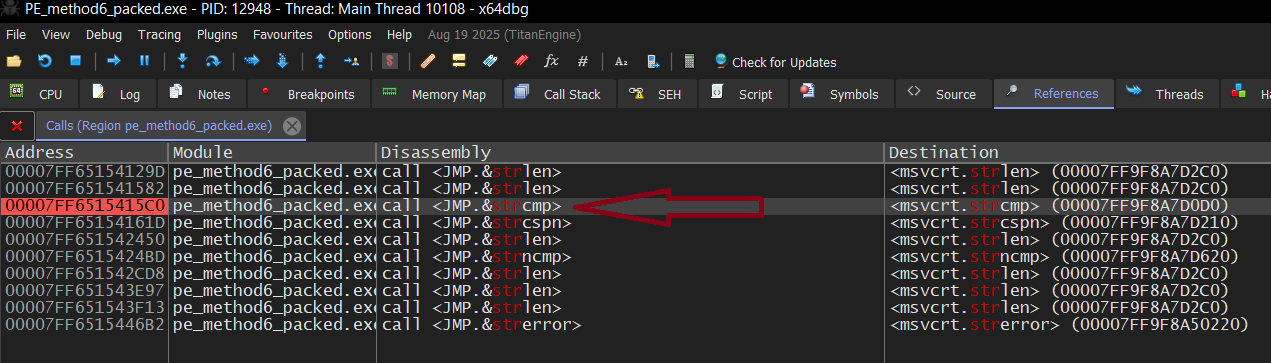 |
|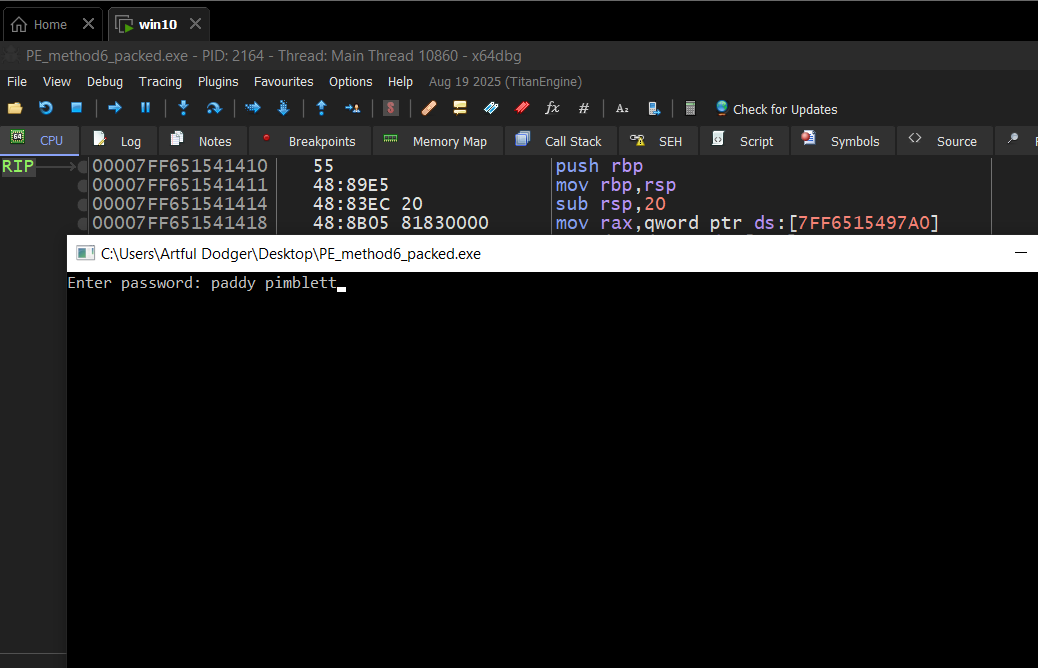
before executing the strcmp, we see the arguments as shows here according to fastcall calling convention, RCX (1st) holds user input, while RDX(2nd) holds the true saved one. 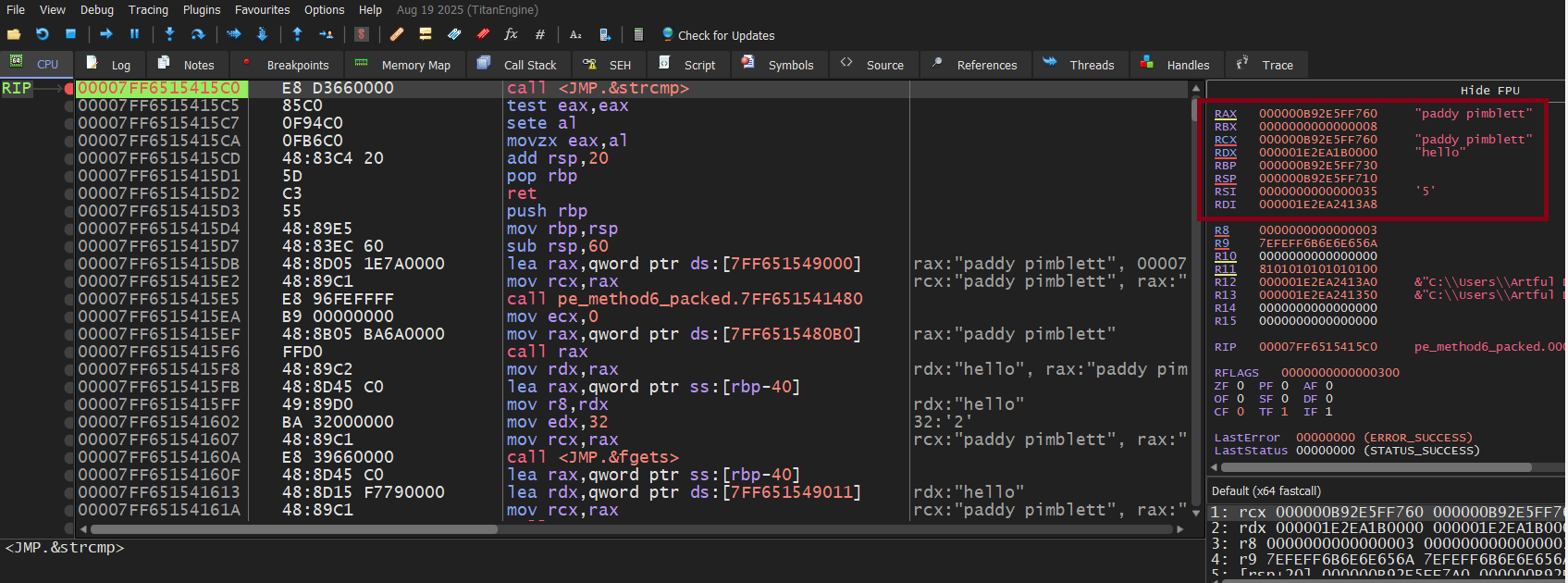
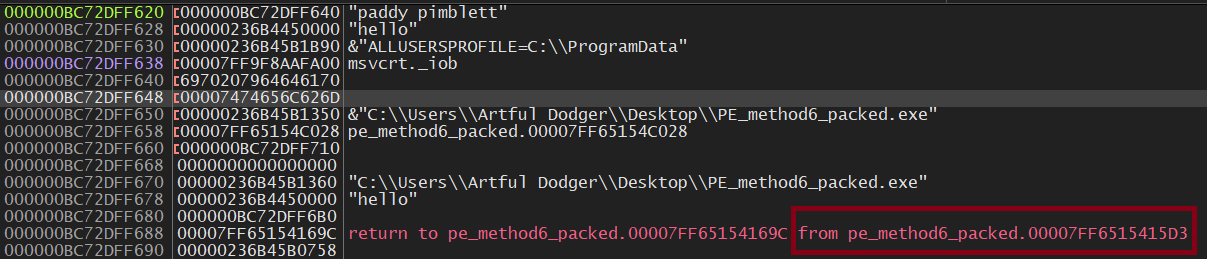
According to the code above, we should be exactly here at address (relative address: 1647) after executing the strcmp inside the validate_input(relative address: 15A5) function, according to rsp value at the top of the stack before executing the ret instruction. and here we go  this leads exactly to the next instruction after calling validate_func
flow is like this :strcmp → validate_input → execute_logic → stage3 → stage2 → stage1 → main
as we see here in the stack, the caller function whose relative address is 15D3 is actually the executing_func in our code
 |
|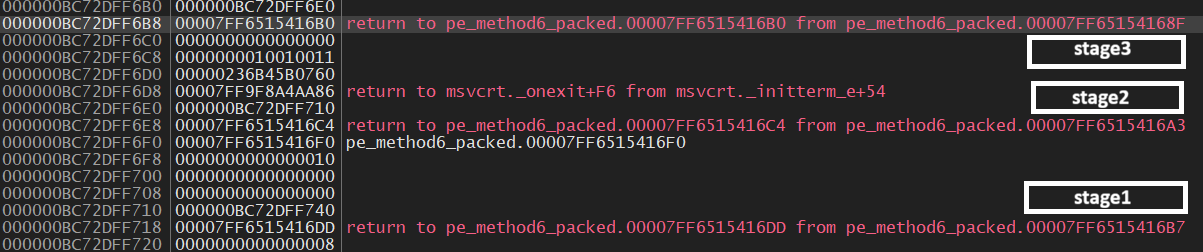
by looking at all return addresses inside the stack, we get here at RA: 1190 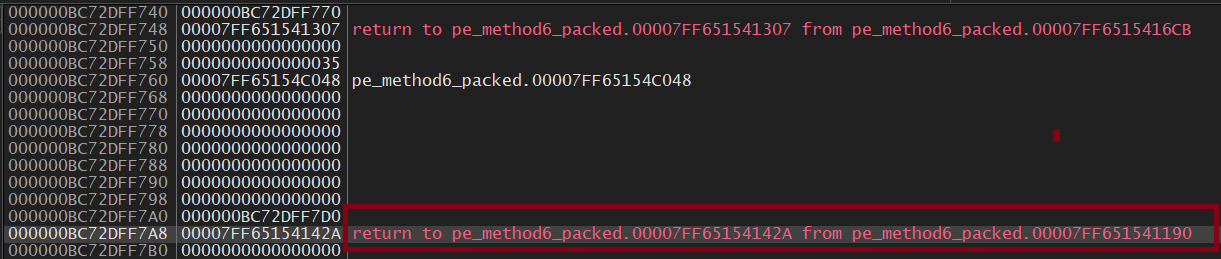
Here I got a little bit confused again because it’s the 3rd OEP we found, but it’s okay. It could be CRT startup code. Dumping at 1190 still produces a valid binary.
Using Scylla
I dumped with Scylla the same way as before and it worked well.
Here is how it looks in IDA: 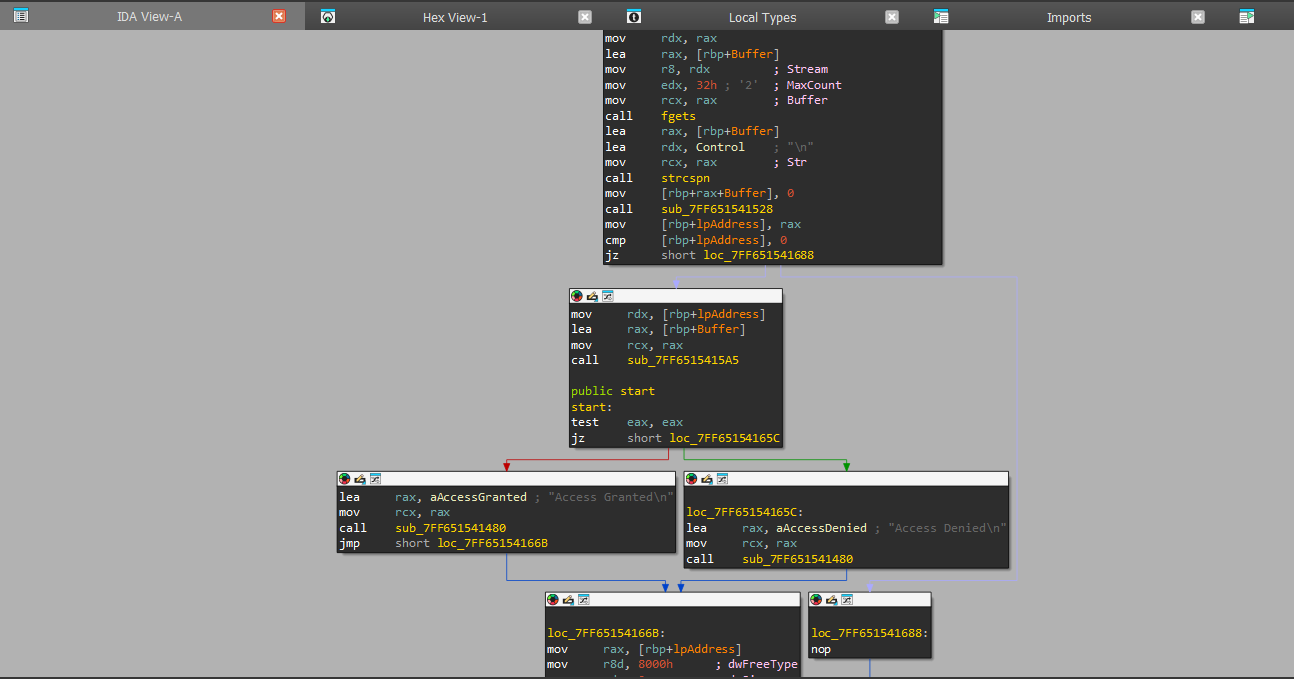
Note
This Technique It works best when the unpacked code quickly starts calling APIs like CreateProcess, InternetOpenUrl, or similar. From there, you can walk the stack backward and figure out how execution reached that point.
It’s not always the best choice for finding the OEP directly, especially in simple samples where the jump happens immediately.
But in more complex malware, where execution goes through multiple layers before doing anything obvious, this method becomes really useful. It helps you reconstruct the full path, not just the entry point.
On the other hand, if the program spends most of its time doing internal work before calling any APIs, this approach becomes less effective. ***
Technique 5 Write the unpacked payload to the allocated memory region
- This Technique is used on real-world Malwares, top-tier CTF Challenges, but with extra anti-techniques to make analysis more harder
- This simulation shows how malware allocates memory, decrypts a payload into it, then makes it executable.
1
2
3
4
5
6
7
8
9
10
11
12
13
14
15
16
17
18
19
20
21
22
23
24
25
26
27
28
29
30
31
32
33
34
35
36
37
38
39
40
41
42
43
44
45
46
47
48
49
50
51
52
53
54
55
56
57
58
59
60
61
62
63
64
65
66
67
68
69
70
71
72
73
74
75
76
77
78
79
80
81
82
83
84
85
86
87
88
89
90
91
92
93
94
95
96
97
98
99
100
101
102
103
104
#include <windows.h>
#include <stdio.h>
#include <string.h>

unsigned char original_payload[] = {


    0x55,                               // push ebp
    0x48, 0x89, 0xE5,                   // mov rbp, rsp
    0x48, 0x83, 0xEC, 0x20,             // sub rsp, 0x20
    0x48, 0x8D, 0x0D, 0x0E, 0x00, 0x00, 0x00,  // lea rcx, [message]
    0xE8, 0x00, 0x00, 0x00, 0x00,       // call printf (to be fixed at runtime)
    0x31, 0xC0,                         // xor eax, eax
    0x48, 0x83, 0xC4, 0x20,             // add rsp, 0x20
    0x5D,                               // pop rbp
    0xC3,                               // ret

    'U', 'n', 'p', 'a', 'c', 'k', 'e', 'd', ' ',
    's', 'u', 'c', 'c', 'e', 's', 's', 'f', 'u', 'l', 'l', 'y', '!', '\n', 0x00
};

#define XOR_KEY 0xAA

unsigned char packed_payload[sizeof(original_payload)];

void init_packed_payload() {
    for (int i = 0; i < sizeof(original_payload); i++) {
        packed_payload[i] = original_payload[i] ^ XOR_KEY;
    }

    printf("[Packer] Original payload encrypted. Ready to unpack at runtime.\n");
}


void unpack_and_execute() {
    printf("[Unpacker] Step 1: Allocating memory...\n");

    SIZE_T payload_size = sizeof(original_payload);
    LPVOID allocated_mem = VirtualAlloc(
        NULL,
        payload_size,
        MEM_COMMIT | MEM_RESERVE,
        PAGE_READWRITE
    );

    if (allocated_mem == NULL) {
        printf("[Unpacker] VirtualAlloc failed!\n");
        return;
    }

    printf("[Unpacker] Allocated memory at: 0x%p\n", allocated_mem);

    printf("[Unpacker] Step 2-3: Decrypting and writing payload...\n");

    unsigned char* dest = (unsigned char*)allocated_mem;
    for (int i = 0; i < payload_size; i++) {
        dest[i] = packed_payload[i] ^ XOR_KEY;
    }

    printf("[Unpacker] Payload decrypted at: 0x%p\n", allocated_mem);

    printf("[Unpacker] Step 4: Changing protection to executable...\n");

    DWORD old_protect;
    BOOL protect_result = VirtualProtect(
        allocated_mem,
        payload_size,
        PAGE_EXECUTE_READ,
        &old_protect
    );

    if (!protect_result) {
        printf("[Unpacker] VirtualProtect failed!\n");
        VirtualFree(allocated_mem, 0, MEM_RELEASE);
        return;
    }

    printf("[Unpacker] Memory protection changed to PAGE_EXECUTE_READ\n");

    printf("[Unpacker] Step 5: Jumping to unpacked payload at 0x%p\n", allocated_mem);
    printf("[Unpacker] ========== EXECUTING UNPACKED PAYLOAD ==========\n\n");

    void (*payload_func)() = (void(*)())allocated_mem;
    payload_func();

    printf("\n[Unpacker] Payload execution finished.\n");

    VirtualFree(allocated_mem, 0, MEM_RELEASE);
}

int main() {
    printf("========================================\n");
    printf("PACKED PROGRAM SIMULATOR\n");
    printf("========================================\n\n");

    init_packed_payload();

    printf("\n[Main] Calling unpacker stub...\n\n");

    unpack_and_execute();

    printf("\n[Main] Program complete.\n");
    return 0;
}
It contains an encrypted Payload(Message) that can’t be executed (Displayed) in its raw form, when the program runs:
It simply
- Allocate private memory (VirtualAlloc) where the unpacked code will live
- unpack the payload(decrypt it)
- write that decrypted payload to the allocated memory
- change memory protection (VirtualProtect) to make that allocated buffer executable
- Transfer execution to payload
This example decrypts only a message. Real malware would unpack a full PE file. The technique is identical
How to Unpack It
Step 1 —> Set breakpoints on VirtualAlloc and VirtualProtect
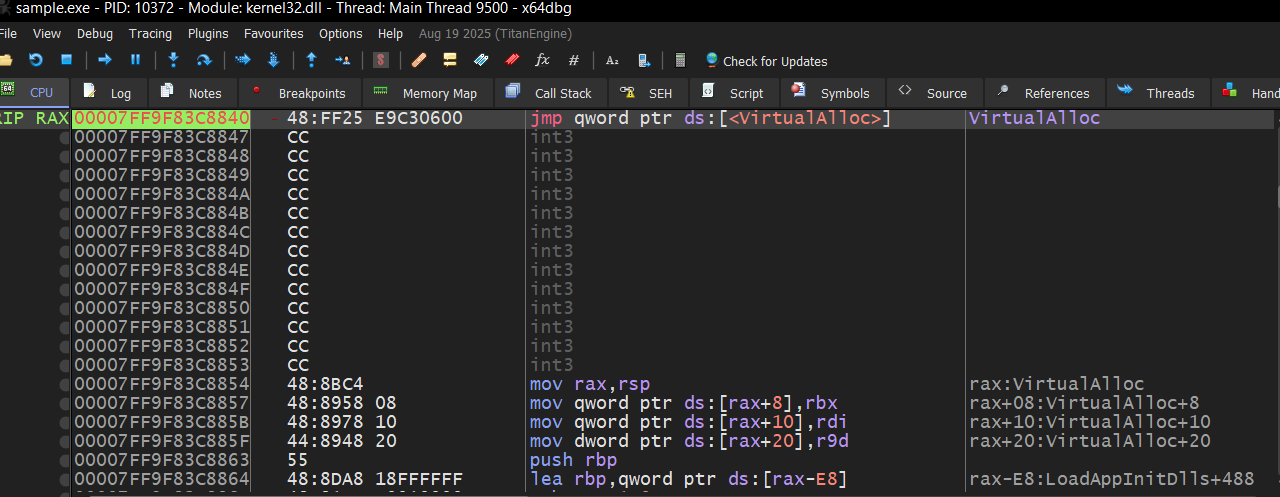 | 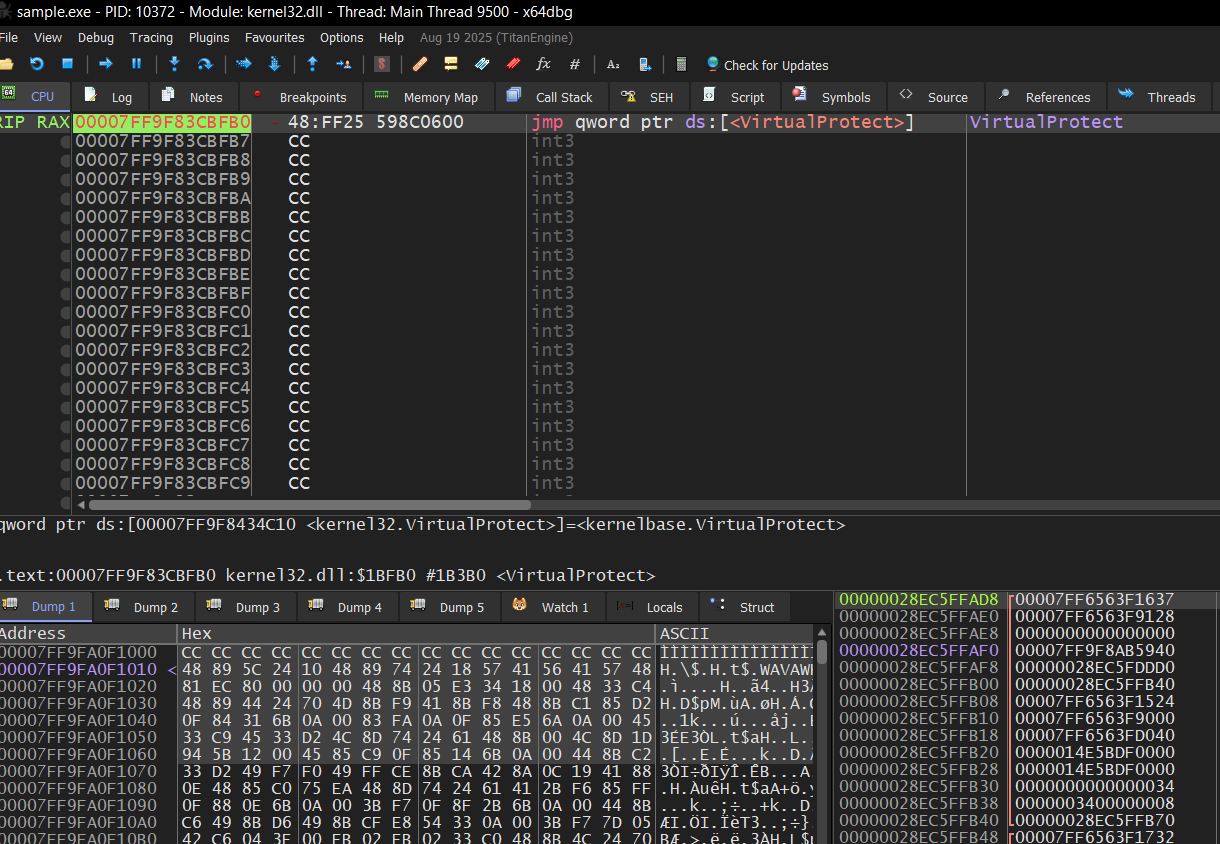 |
Step 2 —> After VirtualAlloc executes, follow RAX in dump
This lets you observe changes in the allocated buffer.
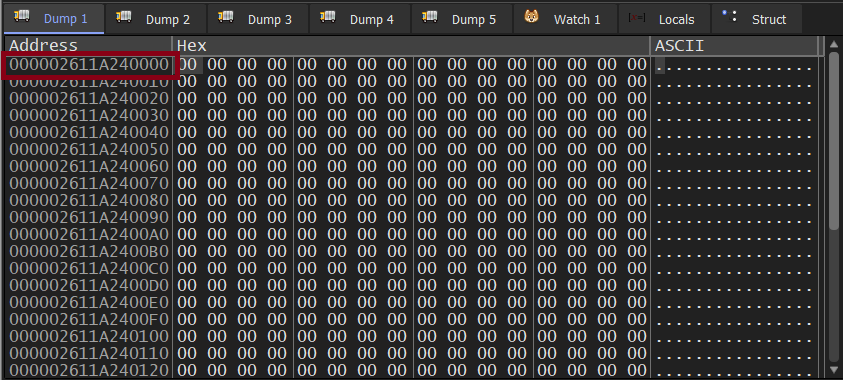
Step 3 — Locate the decryption loop
The XOR loop writes the decoded message directly to the allocated buffer.
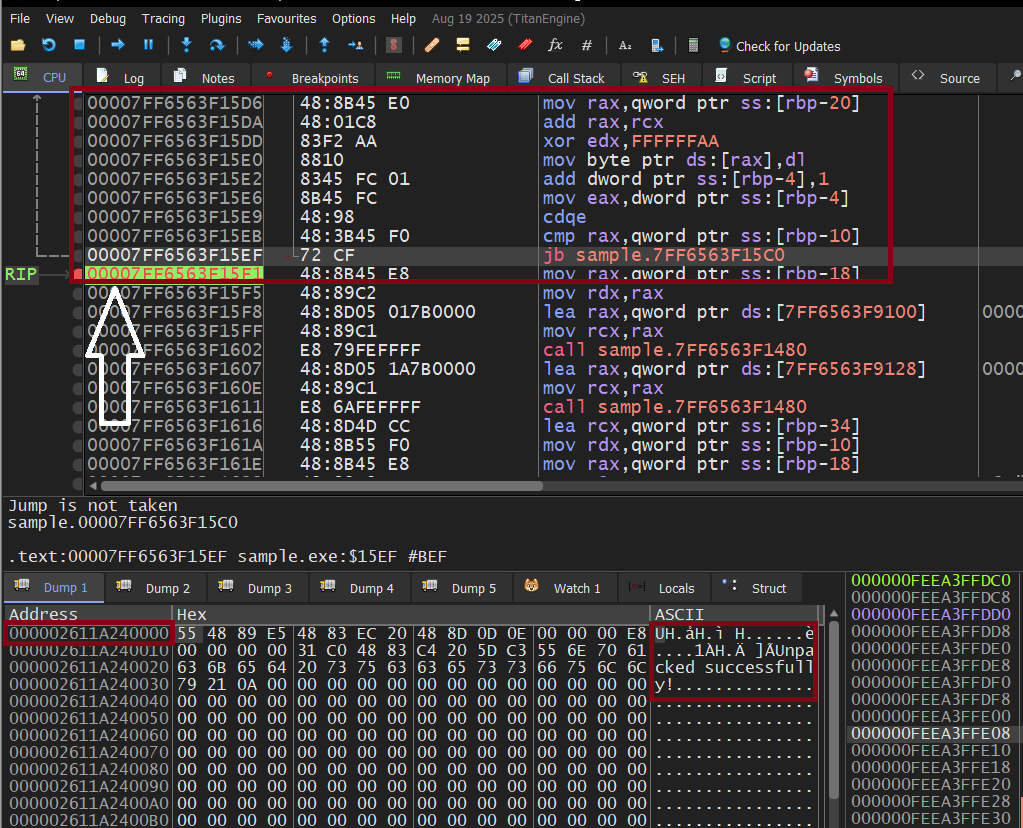
Step 4 — Observe the protection change
The region’s access rights before and after VirtualProtect:
 Protection before VirtualProtect
 Protection after VirtualProtect
Note
In this simulation, VirtualProtect is not strictly needed because we’re only displaying a message. But in real malware, it’s essential — without it, the CPU would crash on execution.
If This Were Real Malware You would see a PE header (MZ…) in the buffer instead of a message. At that point:
Right-click the allocated memory in the dump window
Select Follow in Memory Map
Dump the entire region using Scylla
This matches real-world malware: unpacked code never touches static sections. You’re forced to track runtime memory instead of relying on the PE header.
You can find that Technique applied on a real malware sample here
References
Sikorski, M., & Honig, A. (2012). Practical Malware Analysis. No Starch Press.
Kleymenov, A. (2020). Mastering Malware Analysis. Packt Publishing.